
01
Step 01
Track billed work from the task
Keep client work tied to the right member, project, and task from the start so billing context is already there.
Billtivo helps agencies and service teams assign work, track progress and time, review what is ready to bill, and send invoices with payment follow-up in one connected workflow.
Built for client work teams that want delivery, billing, and follow-up to stay in sync.
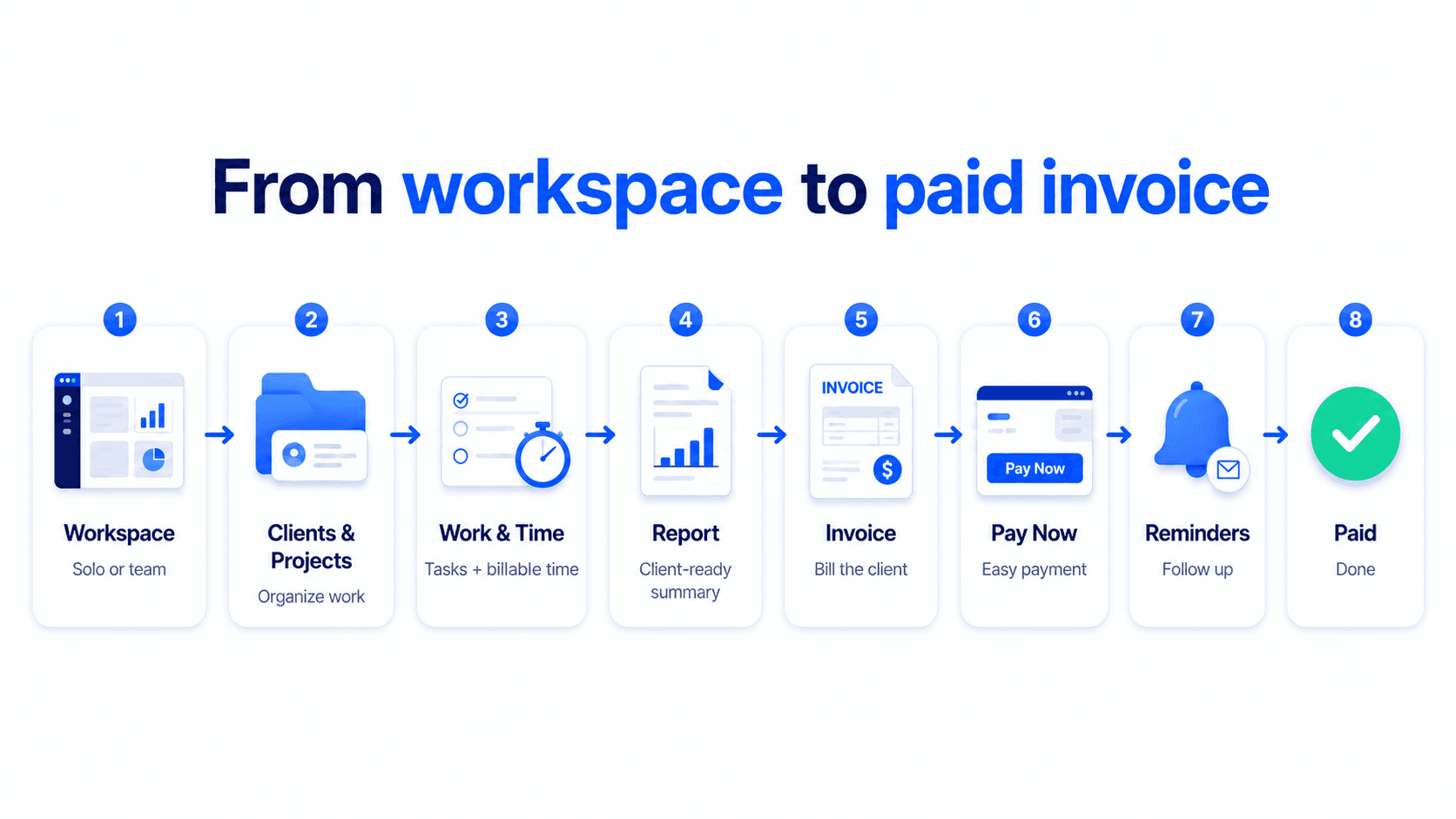
Connect workspace, clients, projects, billable work, reports, invoices, Pay Now, reminders, and paid status in one flow.
Track work, not spreadsheets
Turn updates into billable work
Send invoices and follow up automatically
When tasks, progress, tracked time, and invoicing live in separate tools, completed work is easy to miss. Billtivo keeps them connected so your team can deliver work and your owner/admin can bill it faster.
Keep client work tied to the right member, project, and task from the start so billing context is already there.
Members can send progress updates, submit work reports, and log billable time while the work is happening.
Review unbilled time and completed work before turning it into invoice lines, without rebuilding everything by hand.
Create the invoice, share it, enable payment, and follow up with reminders from the same workflow.
Core billing workflows
Billtivo connects assigned work, tracked time, client-ready reports, invoices, and payment follow-up. Start with the workflow that matches how your service work gets billed.
These screens show how Billtivo connects task-based work, tracked time, invoice review, and payment follow-up in one workflow.
See what has been worked, what is still unbilled, and what is ready to move into an invoice.
Follow up after sending invoices with reminder settings and payment-ready workflows.
Assign work, review progress, and keep team activity aligned with invoice creation.
Keep delivery and billing tied to the same client and project structure.
Control seats, billing settings, and workspace-level admin options in one place.
Billtivo fits teams that bill from completed work, tracked time, and delivery progress - not just standalone invoices.
Service teams that assign client work, track delivery, and need billing to follow the work already done.
Agencies and consultants that manage projects, progress updates, and invoice follow-up across multiple clients.
Freelancers growing into a workflow and moving beyond one-off invoice sending.
Start free if you only need invoices. Upgrade when you need owners, members, shared work, and billing follow-up in one place.
For sending invoices without team workflow.
For one-person client work with more control.
For owners assigning work and members logging progress before billing.
For growing teams that need a stronger billing workflow across shared workspaces.
Answers to the questions people ask before they try a new workflow for client work, billing, and payment follow-up.
Yes. Billtivo still supports fast invoice creation without forcing account setup first.
Yes. Members can report status, notes, files, and time so owners can review work before billing.
No. Billtivo is designed to keep assigned work, progress, billable time, invoices, and reminders in one workflow.
Both, but the assigned-work workflow is especially strong for small service teams where owners bill based on work completed by members.
You can keep payment follow-up in the same flow with reminders and payment options instead of exporting work into another billing system.
Use Billtivo to assign client work, collect progress, review billable time, send invoices, and follow up on payment in one place.